Product Updates - March 2026
New AI features, improved budget management, and optimized shift planning
|
|
|
In this update, we introduce powerful new capabilities including AI-powered expense document reading, an improved project budget interface, and an optimized schedule planner for shift management. These features are designed to automate routine tasks and give you better visibility into finances and human resources.
|
|
FEATURE 01
AI Expense Document Reading
Built-in AI functionality for automatic reading and recording of expense documents (invoices, credit/debit notes, protocols). The system uses artificial intelligence to extract key data from scanned or electronic documents and automatically fills in the expense form.
| ✓ |
Automatic supplier recognition: Legal entity, Tax ID, VAT number, IBAN, and payment method |
|
| ✓ |
Document data extraction: Document type, date, due date, currency, and document number |
|
| ✓ |
Automatic line item population: Product, description, category, cost center, quantity, unit price, and total value |
|
| ✓ |
Category and cost center classification: AI suggests category and cost center based on historical data |
|
| ✓ |
Automatic VAT calculation: Determination of purchase type (VAT), rate, and value |
|
| ✓ |
Pre-configuration: Settings per legal entity for customized behavior |
|
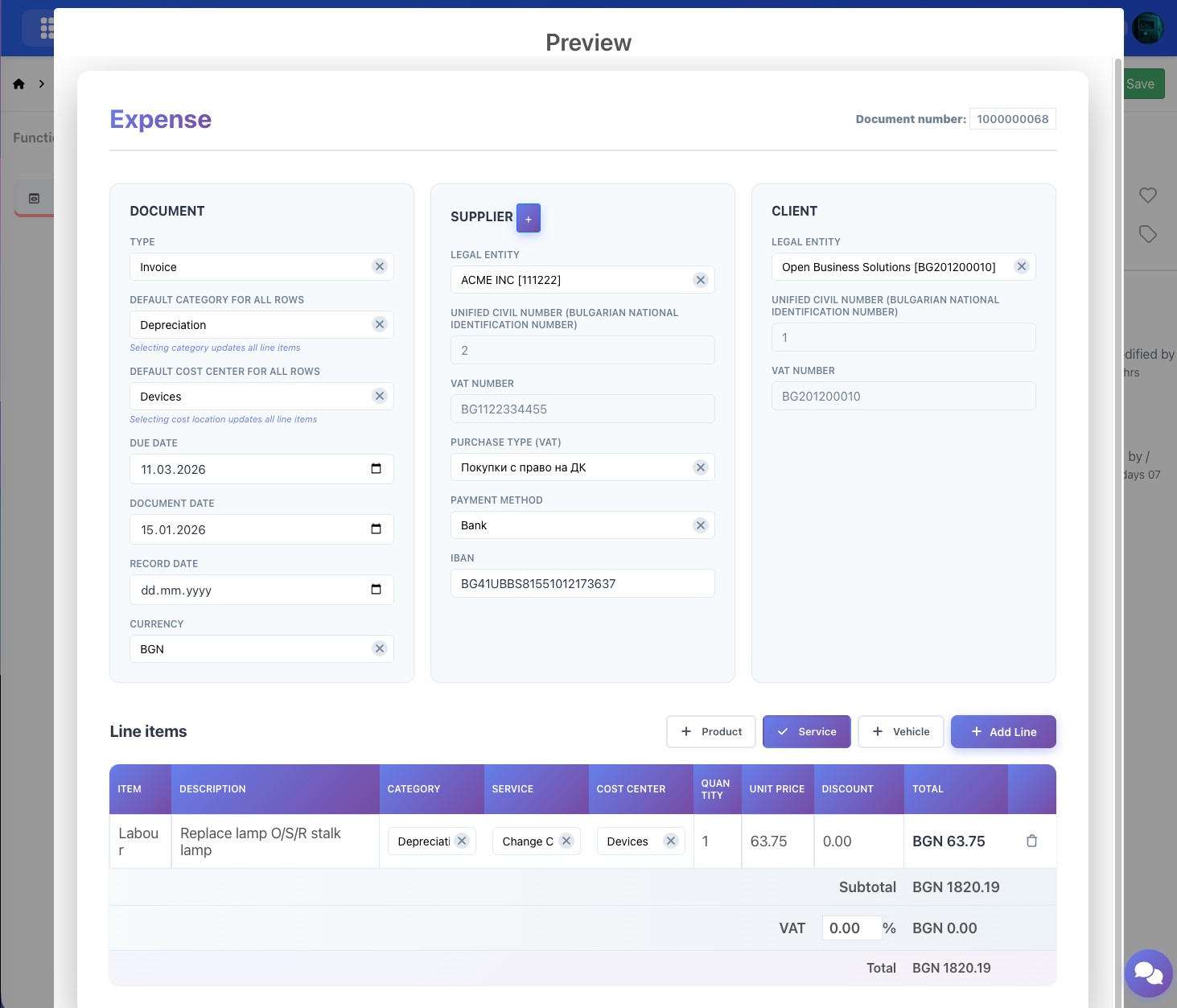
Benefits: Drastically reduce document entry time, minimize human errors, and accelerate expense accounting.
|
|
FEATURE 02
Project Budgets
A new interface for viewing and editing project budgets that provides complete financial visibility across all tasks and items in a project. Manage budgets at the task level, track materials and services, and maintain precise control over project expenses.
| ✓ |
Budget overview: Visualize total budget, number of tasks, and budgeted items in one place |
|
| ✓ |
Budget items: Add materials and services with quantities, unit prices, and total values |
|
| ✓ |
Task hierarchy: View sub-tasks with individual budgets and statuses (Draft, Assigned, Completed) |
|
| ✓ |
Quick editing: Edit and delete budget items directly from the interface |
|
| ✓ |
Budget summary: Generate summary reports for the entire project budget |
|
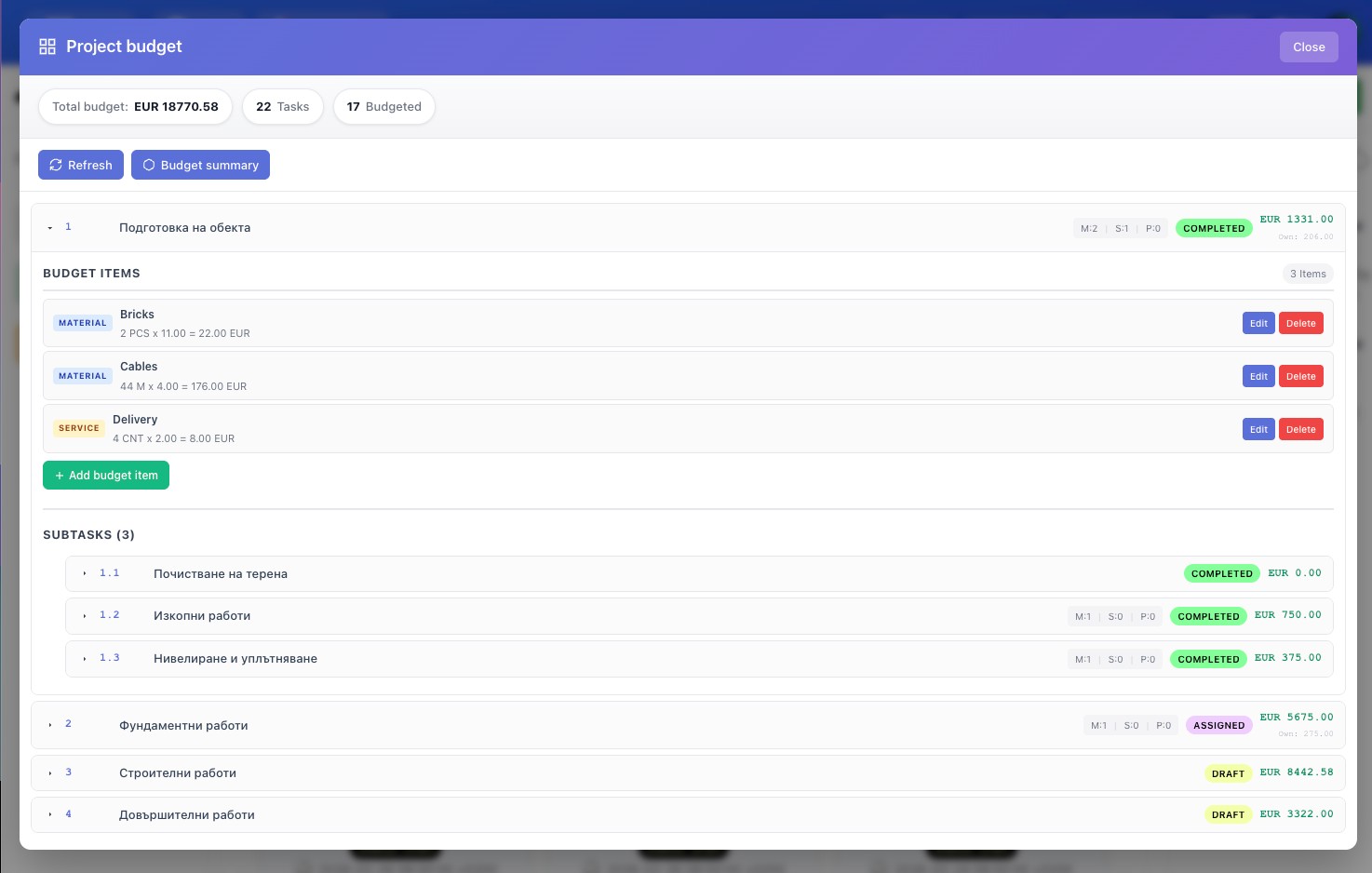
Ideal for: Project managers and finance teams who need detailed control over project budgets and expenses.
|
|
FEATURE 03
Schedule Planner
Improved schedule planner visualization with added shift code information and extended filtering capabilities. The new interface provides a clearer view of work schedules with color coding for different shift types and absences.
| ✓ |
Shift codes: Clear indication of shift type (D - day shift, VAC - vacation, DAC, D_ILL - sick leave, WAC, etc.) |
|
| ✓ |
Detailed shift information: Selecting a shift displays description (e.g., "Standard Work Day 09:00-18:00, 1h break") |
|
| ✓ |
Enhanced filtering: Filter by branch, department, manager, and employee |
|
| ✓ |
Color coding: Different colors for vacations, sick leave, and special shifts for quick orientation |
|
| ✓ |
Export options: Legend, Excel, PDF, and print directly from the interface |
|
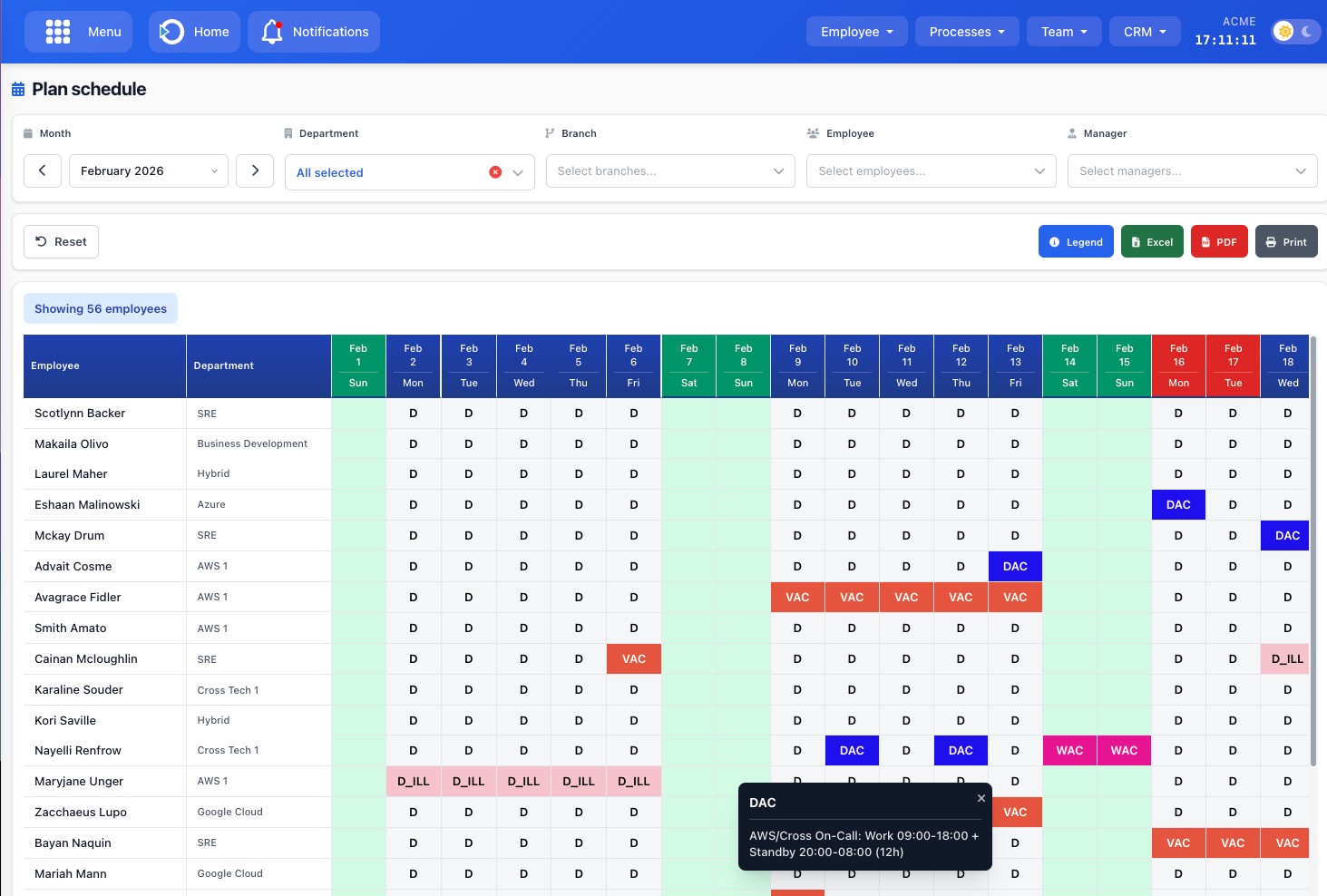
Benefits: Easier planning and review of work schedules, quick identification of absences, and better communication between HR and managers.
|
|
OTHER UPDATES
Additional Improvements
This release also includes a number of additional improvements across various system modules:
| ● |
Approval Requests: Updated interface with improved design and functionality |
|
| ● |
Receivables Settlement Tool: Improvements in the "Overpayment" processing module |
|
| ● |
Analytical Register Reports: Improvements in report generation and visualization |
|
| ● |
VAT Journals: Now support values in EUR |
|
| ● |
Civil Contracts: Module update - invoices are now in Euro |
|
|
|
Ready to try the new features?
Contact us for a demonstration or visit our documentation for more information.
|
|
|
© 2026 OBS2GO. All rights reserved.
www.obs2go.com
|
|