Product Updates - January 2026
Discover powerful new features designed to streamline your operations and enhance productivity
|
|
|
We're excited to share our latest innovations. From advanced attendance tracking to AI-powered assistance, these updates bring powerful capabilities to help your organization work smarter and more efficiently.
|
|
FEATURE 01
Attendance Management Solution
Transform raw access control data into actionable attendance insights with our comprehensive attendance and access management system. Built for organizations with physical access control systems, this solution bridges the gap between badge events and workforce management.
From automated shift calculations to lone worker safety visibility, the system delivers accurate, auditable data without manual intervention. Whether tracking net work time in regulated zones or monitoring employee presence across multiple sites, this solution provides the operational clarity HR, security, and management need.
| ✓ |
Automated Processing: Hourly background jobs transform access events into attendance summaries automatically |
|
| ✓ |
Net vs Brute Time Calculation: Track both raw presence and actual working time in designated zones |
|
| ✓ |
Real-Time Safety Monitoring: Live dashboard for lone worker status and location visibility |
|
| ✓ |
Anomaly Detection: Automatic flagging of missing badges, long shifts, and data inconsistencies |
|
| ✓ |
Self-Service Employee Portal: Empower employees to view their own attendance and hours |
|
| ✓ |
Flexible Reporting: Daily, weekly, and monthly views with export capabilities |
|
Perfect for: Service and manufacturing companies requiring accurate workforce visibility and compliance-ready audit trails.
Read more →
|
|
FEATURE 02
AI Chatbot Trained with Product Documentation
Meet your new AI Assistant - an intelligent chatbot trained on comprehensive product documentation to provide instant, accurate answers to your questions. Available 24/7, this smart assistant understands context, learns from interactions, and helps users navigate complex features with ease.
| ✓ |
Instant Answers: Get immediate responses to product questions without searching through documentation |
|
| ✓ |
Context-Aware: Understands your workflow and provides relevant suggestions based on your current task |
|
| ✓ |
Always Learning: Continuously improves responses based on user interactions and feedback |
|
| ✓ |
Multilingual Support: Communicates in your preferred language for better accessibility |
|
| ✓ |
Guided Workflows: Step-by-step assistance for complex processes and configurations |
|
Benefits: Reduce support tickets, accelerate user onboarding, and empower teams with instant access to knowledge.
|
|
FEATURE 03
Group Chat Feature
Enhance team collaboration with our new group chat functionality. Perfect for project discussions, organizational activities, and real-time communication, this feature brings your teams together in focused conversation spaces.
| ✓ |
Project-Based Groups: Create dedicated chat spaces for each project or team initiative |
|
| ✓ |
Real-Time Messaging: Instant communication with online status indicators |
|
| ✓ |
Easy Group Management: Quickly view, create, and organize groups from a central interface |
|
| ✓ |
Seamless Integration: Access chats directly within your workflow without switching applications |
|
| ✓ |
Searchable History: Find past conversations and decisions with powerful search capabilities |
|

Use Cases: Project coordination, department discussions, cross-functional collaboration, and quick team updates.
|
|
FEATURE 04
Cash Receipt Scanning Widget
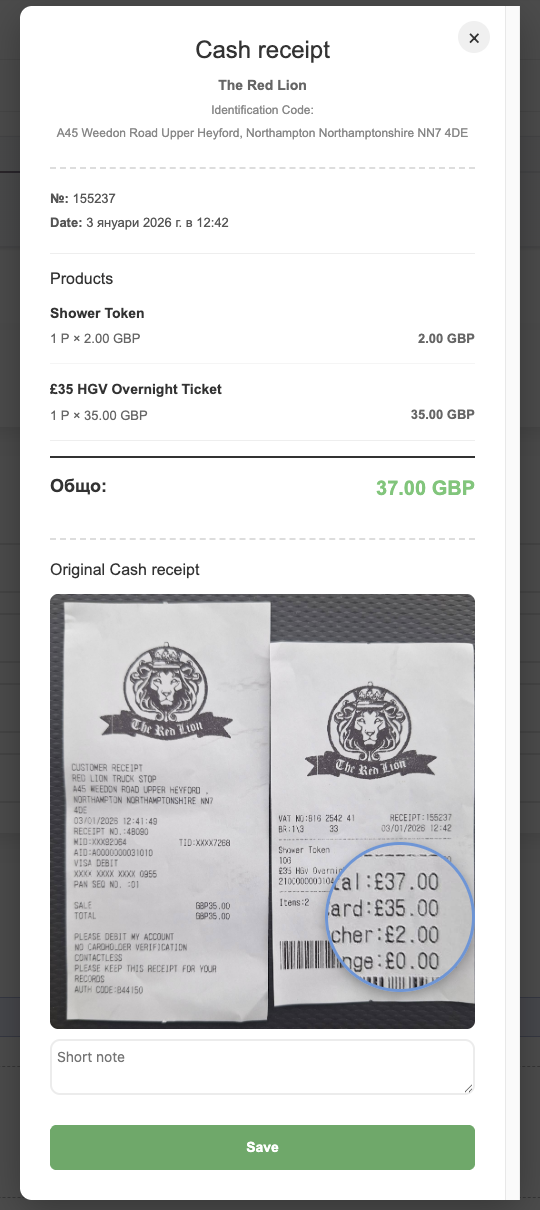
Digitize expense management with our intelligent cash receipt scanning widget. Capture receipts directly from your mobile device, extract data automatically using OCR technology, and streamline the approval process - all in one seamless workflow.
| ✓ |
Mobile Scanning: Capture receipts on-the-go using your smartphone camera |
|
| ✓ |
OCR Technology: Automatically extract merchant name, date, items, and total amount |
|
| ✓ |
Smart Data Recognition: Identifies and structures receipt information for accurate record-keeping |
|
| ✓ |
Approval Workflow: Responsible persons can review and approve or reject scanned receipts |
|
| ✓ |
Digital Archive: Original receipt images stored alongside extracted data for audit purposes |
|
| ✓ |
Expense Tracking: Automatically link receipts to projects and expense categories |
|
Benefits: Eliminate manual data entry, reduce errors, speed up reimbursements, and maintain complete expense documentation.
|
|
FEATURE 05
Project Budget vs Expense Report
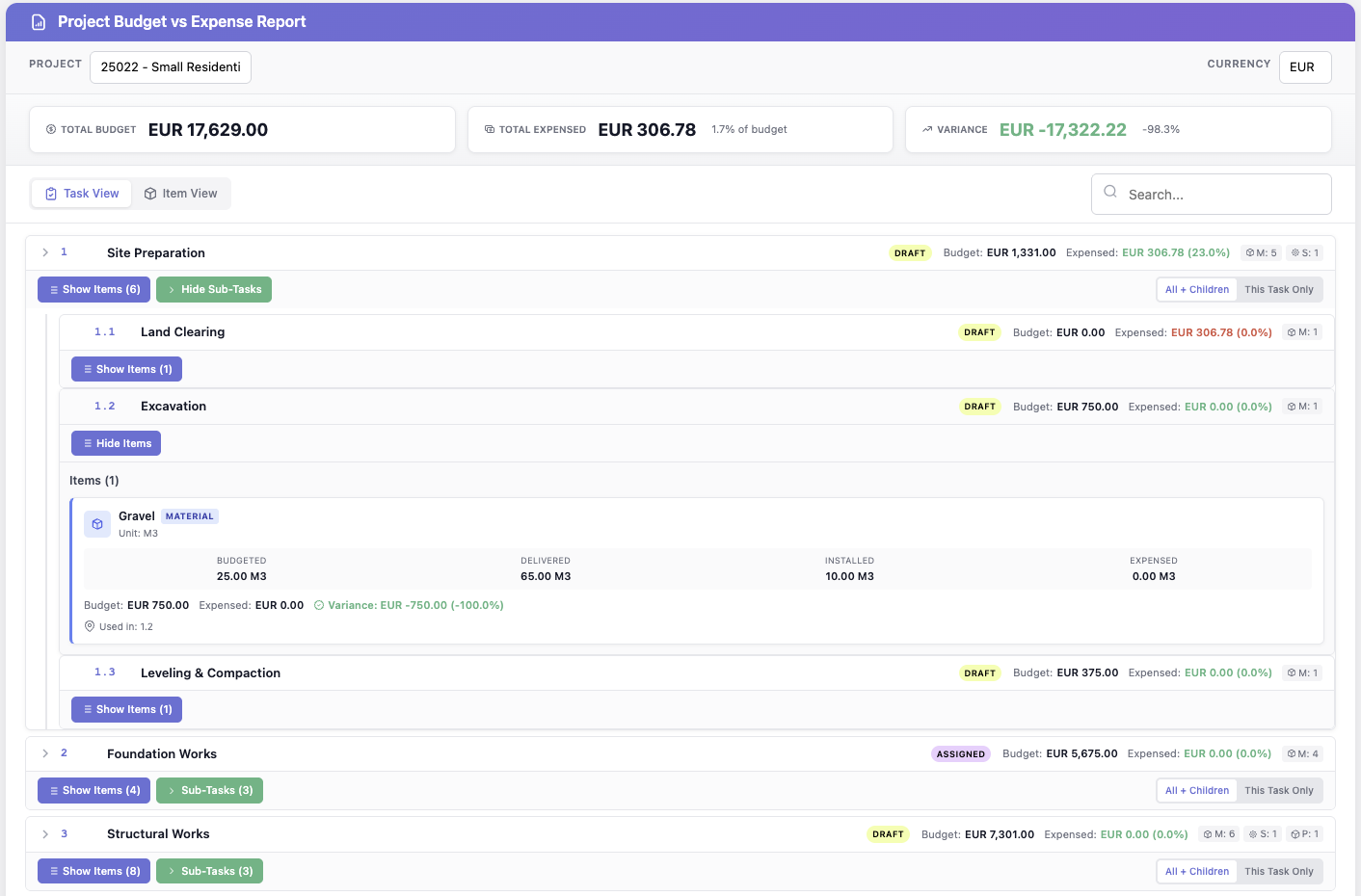
Gain complete financial visibility with our comprehensive project budget tracking system. Monitor expenses against budgets in real-time, track material usage across tasks, and identify variances before they become problems.
| ✓ |
Real-Time Budget Tracking: See total budget, expenses, and variance at a glance |
|
| ✓ |
Hierarchical Task View: Drill down from project level to individual tasks and materials |
|
| ✓ |
Material Allocation: Track budgeted, delivered, installed, and expensed quantities for each item |
|
| ✓ |
Variance Analysis: Automatic calculation of budget vs actual with percentage indicators |
|
| ✓ |
Task Status Tracking: Monitor draft, assigned, and completed tasks with budget status |
|
| ✓ |
Multi-Currency Support: Handle international projects with automatic currency conversion |
|
| ✓ |
Flexible Reporting: Switch between task view and item view for different perspectives |
|
Perfect for: Construction projects, facility management, and any organization requiring detailed cost tracking and budget control.
|
|
|
Thank you for being a valued partner!
We're committed to continuously improving our platform to meet your evolving needs.
Questions or feedback? We'd love to hear from you.
|
|