
Form Description
Form Description
Document forms capture and organize critical data needed to track, review, and approve documents efficiently.
This section provides an overview of the essential fields and their importance in ensuring traceability and compliance with GMP requirements.
Document and Details
The Document and Details sections capture essential information about the document, ensuring its traceability and compliance with established standards. These sections include key attributes such as the document's name, code, group, version, training requirements, print options, related documents, destinations, and associated items. Detailed information is outlined below:
- Section: "Document"
- Issuer: Specifies the organization for which the document is valid.
- Department: Indicates the department to which the document pertains.
- Code: A unique identifier automatically generated in the format {Group Index}-{Sequential Number} (e.g., "SOP-00001"). This consists of:
- Group Index: A predefined identifier from the Document Group (e.g., "SOP", "PA", "GUI").
- Sequential Number: A 5-digit number incremented based on the last document created in the same group and company. Starts at "00001" if no prior document exists.
For document groups configured with suffix numbering (e.g., market variants of the same document), the format becomes {Parent Code}-{Suffix} (e.g., "SOP-00043-001", "SOP-00043-002"). The suffix is a 3-digit number that increments for each variant of the parent document.
Example: "SOP-00001" or "SOP-00043-001"
- Code Local: An alternative code generated using non-Latin characters (e.g., Cyrillic, Chinese, Arabic), following the same numbering logic as the primary Code field. This is defined by the "Index Local" setting in the Document Group configuration.
Example: "СОП-00001" for Cyrillic
- Version: Document versions are structured as {Major}.{Minor}.{Status}, which reflect:
- Major Version: Increases when significant revisions are made, such as when the document returns from "Effective" to "Start" status.
- Minor Version: Increments with smaller changes, typically during uploads in the "Review" stage.
- Status Version: Tracks the current step in the approval process, updating with each workflow stage.
Example: "01.02.03" where "01" represents the major version, "02" reflects minor revisions, and "03" indicates the current status in the workflow.
- Name: The title of the document.
- Date: The issuance or last update date of the document.
- Group: Represents the document's group (e.g., "SOP", "PA"), used in generating its unique code.
- Section: "Details"
- Requires Training: Indicates whether training is mandatory for this document.
- Print Option: Specifies the printing rules and includes:
- Non-controlled
- Hardcopy controlled
- Effective
- Related Document: Links the document to other relevant records in the system for general reference purposes, with no restrictions on document group or type. This is used for cross-referencing and does not affect code generation.
- Parent Document: Specifies the main document for which this record is a variant (e.g., market-specific versions of a product specification). When set, the document receives a suffix code based on the parent's code (e.g., "PROD-SPEC-00043-001" for the first variant of "PROD-SPEC-00043").
- Can only be set for document groups with "Uses Suffix" enabled
- Must reference a document from the same document group
- Can only be changed when the document version is 01.01.01
- Destination: Defines the intended destinations (e.g., countries, factories) as managed in the "Destinations" module.
- Art. №: Connects the document to an item from the "Items" module, which serves as a catalog.
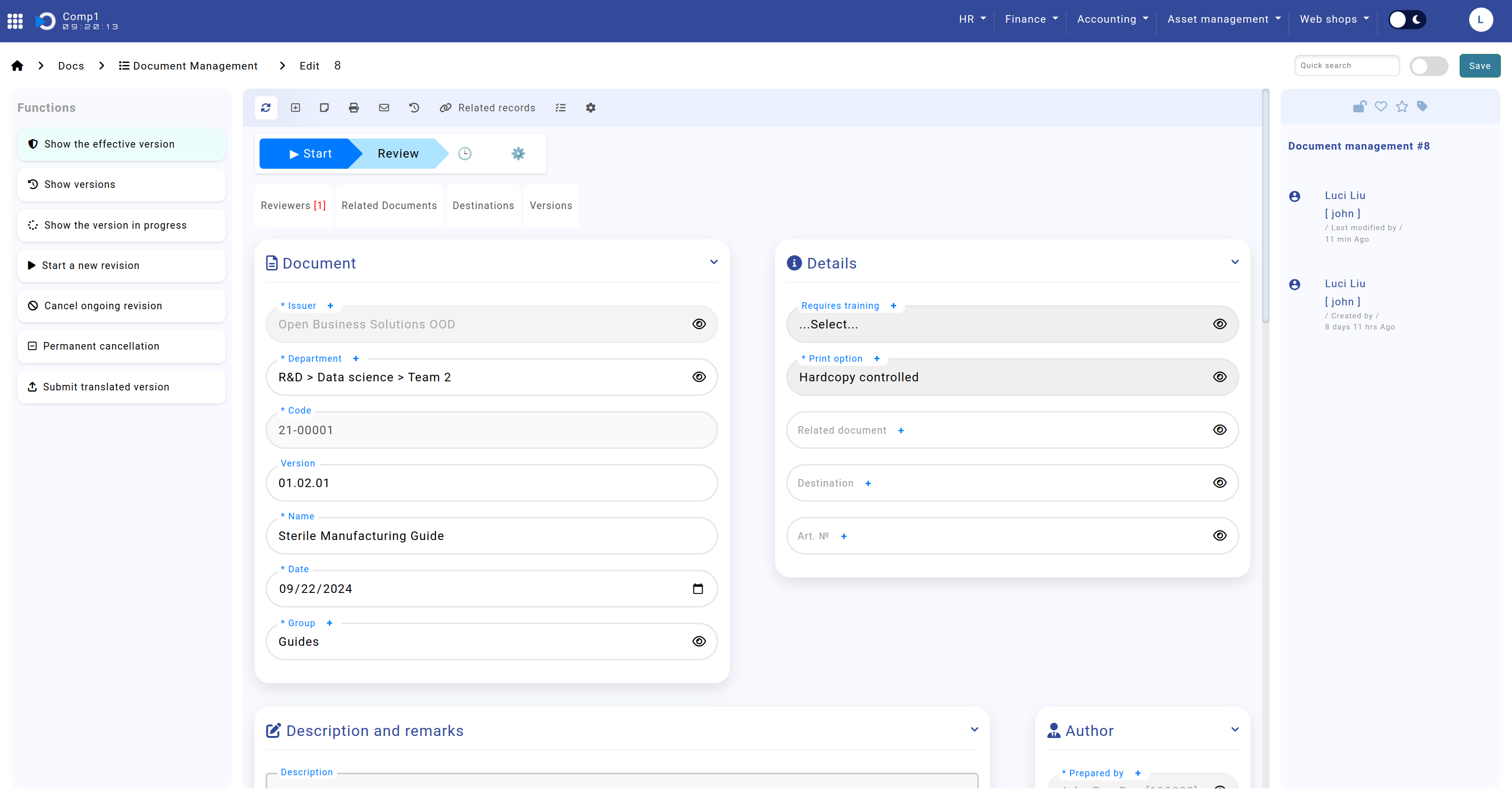
The screenshot shows the Home screen > Docs > Document Management > sections "Document" and "Details".
Description and Remarks
The Description and Remarks sections are critical for capturing contextual information and feedback during the document lifecycle.
- Description: Allows the author to provide a detailed overview of the document.
- Remarks: Enables reviewers to leave comments when returning a document for corrections.
These sections ensure all necessary information is documented to maintain compliance and facilitate revisions.
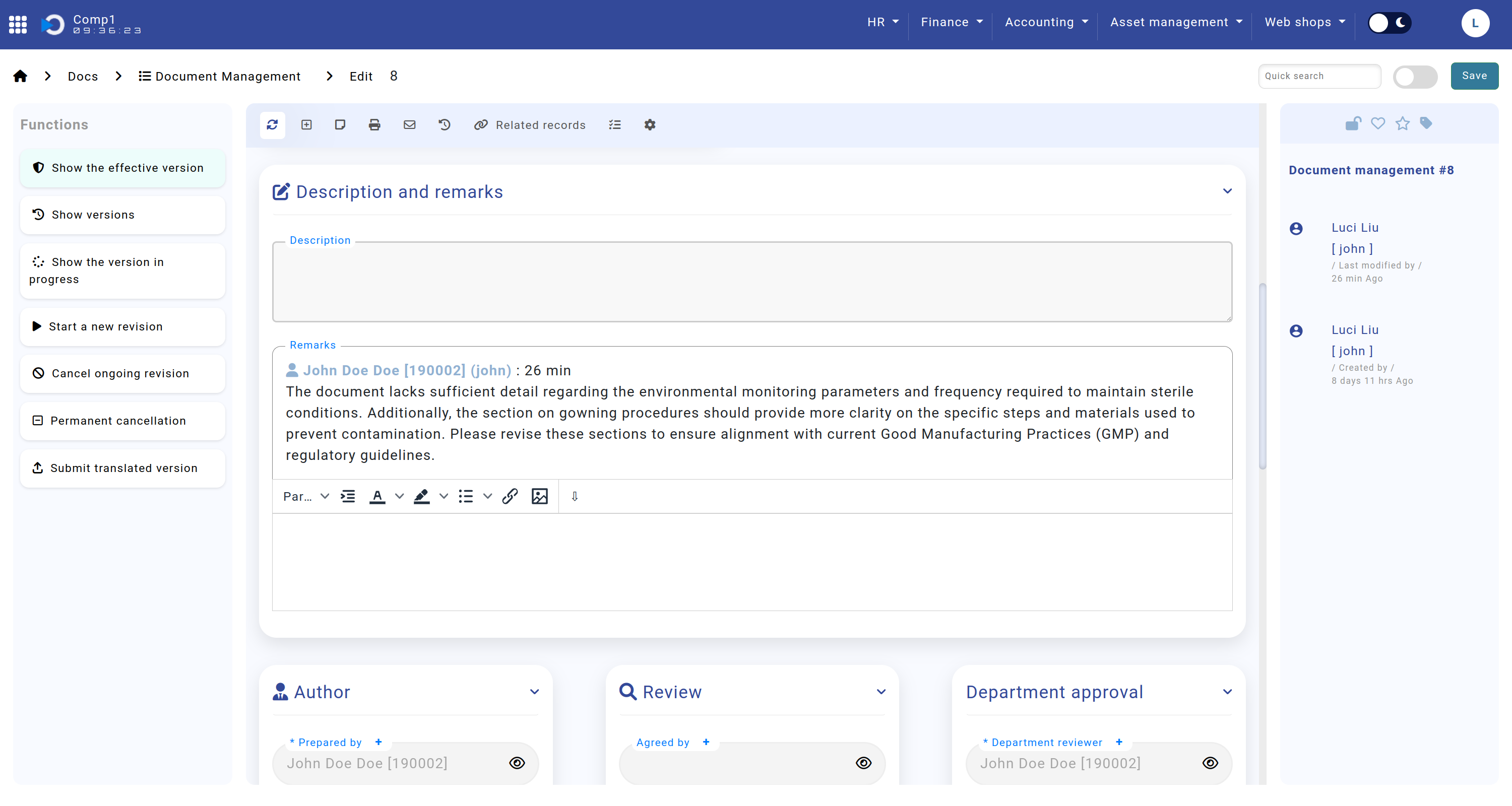
The screenshot shows the Home screen > Docs > Document Management > sections "Description and Remarks".
Remaining Sections
The Remaining Sections provide insights into the document's workflow history, including approvals, rejections, and archival status. Additionally, legacy document information can be entered here for cross-referencing.
- Author: The individual who created the document and the submission date.
- Review: Details of reviewers, including names and review dates.
- Department Approval: Information about the department review and approval timeline.
- Quality Control: Details of the quality check and its completion date.
- Effective Document: Final approval details, including the responsible person and date.
- Retiring: Records for documents retired from use, including responsible personnel and date.
- Rejection: Information about permanently rejected documents, including the responsible person and reason.
- Other: Fields for noting the next revision date and training completion status.
- Legacy Info: Links the document to its corresponding record in the legacy system for historical context.
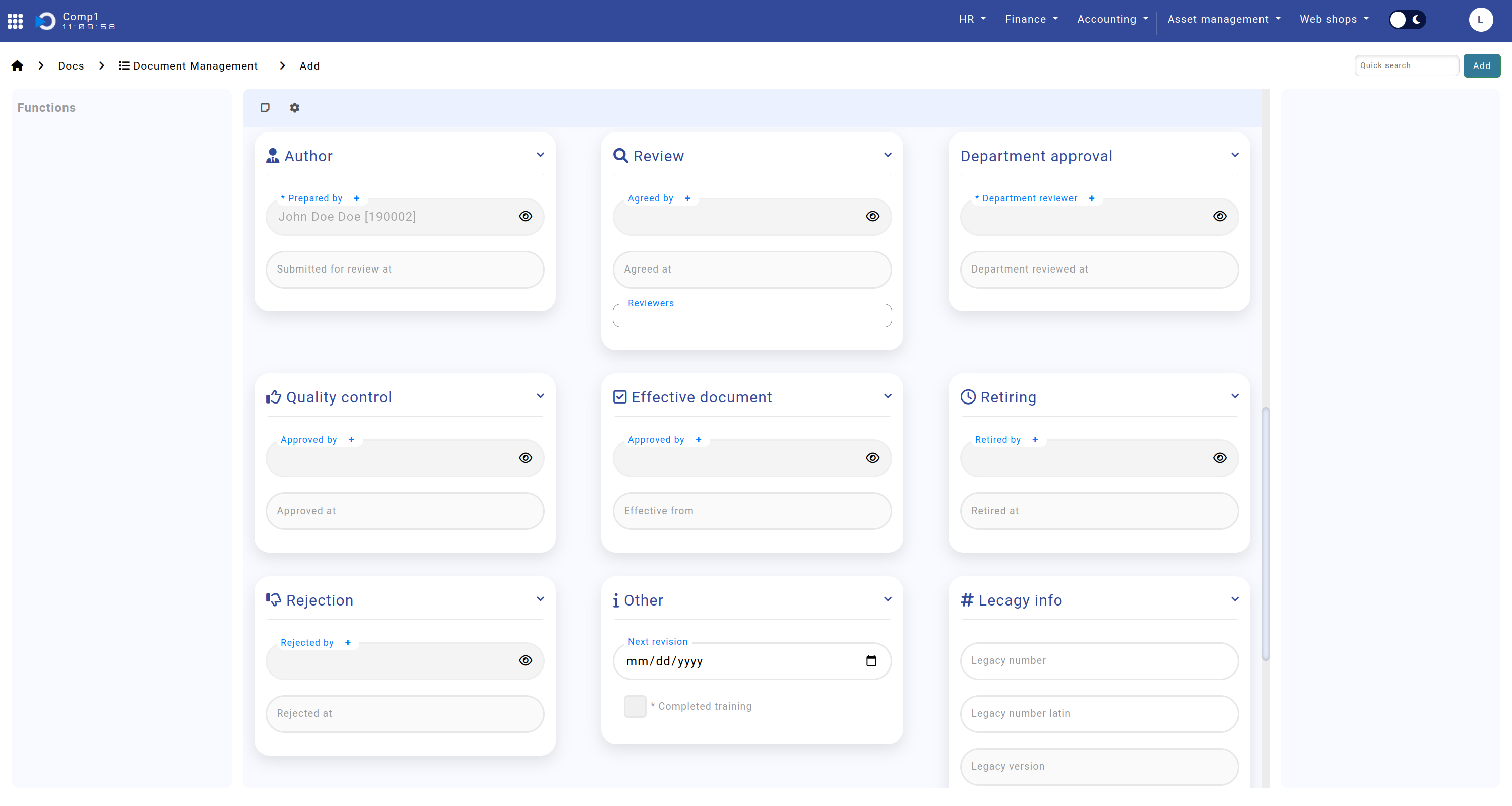
The screenshot shows the remaining sections: Home screen > Docs > Document Management > sections "Author", "Review", "Department Approval", "Quality Control", "Effective Document", "Retiring", "Rejection", "Other", and "Legacy Info".